Wine.com
업데이트 날짜
현재 버전
2.5.534
제공자

작은 휴대폰 화면에서 앱 사용에 지치셨나요? MEmu Play를 사용하면 큰 화면에서 앱을 경험할 수 있습니다! MEmu Play의 키보드와 마우스 기능은 앱의 숨겨진 잠재력을 깨워줍니다. 컴퓨터에 Wine.com 앱을 다운로드하고 설치하면 배터리 수명이나 과열 걱정 없이 좋아하는 앱을 즐길 수 있습니다. MEmu Play를 사용하면 컴퓨터에서 앱을 쉽게 사용할 수 있으며, 언제나 고품질 경험을 보장합니다!
더보기
MEmu Play로 PC에서 Wine.com 을 사용하는 최고의 경험을 즐겨보세요. 강력한 무료 안드로이드 에뮬레이터로, 데스크톱 버전에서 수천 개의 안드로이드 앱을 사용할 수 있습니다. 친구들과 소통하고 더욱 효율적으로 작업물을 다듬어 보세요! The #1 Online Wine Store, Wine.

The #1 Online Wine Store, Wine.com has the largest selection of wine and spirits (liquor) available to order and deliver across the US. With the Wine.com app, wine country is wherever you want it to be. And all you need to discover and buy wine online is an open mind and an empty glass.
- Every region you want to explore
- Expert guides ready to chat
- Free shipping with StewardShip
Use the Wine.com app to bring wine country to your doorstep:
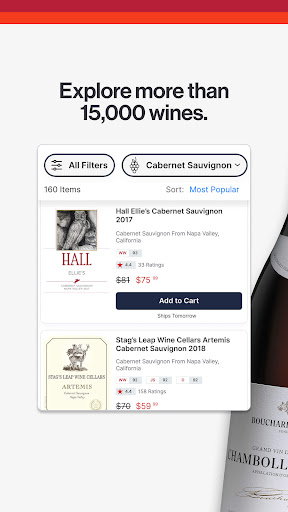
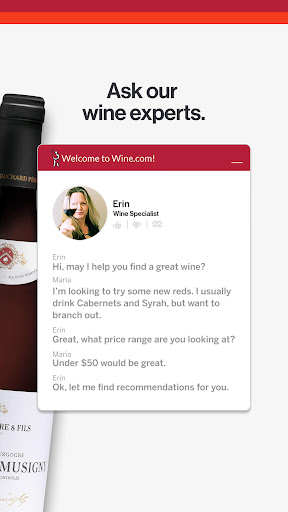
+ Browse our extensive assortment using the app's powerful search, filter, and sort capabilities, or chat with our friendly, non-commissioned wine and spirits experts to help you find the perfect bottle.
+ Explore our selection of spirits, including whiskey, vodka, gin, rum, tequila, mezcal, brandy, cognac, and more—now available for shipping to California, New York and New Jersey.
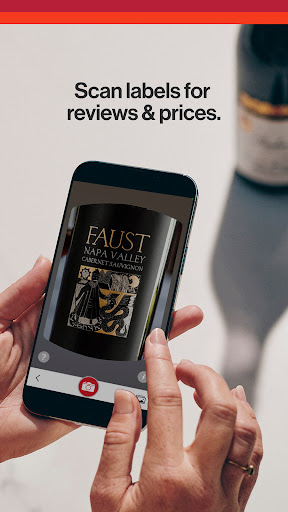
+ Use your phone’s camera to scan a wine or spirits bottle label to view prices, professional ratings, and tasting notes, or to make a purchase on the go.
+ Enjoy free access to critical scores from the world’s most trusted wine professionals, including critics from Wine Spectator, Robert Parker’s The Wine Advocate, Wine & Spirits Magazine, Wine Enthusiast, JamesSuckling.com, Whiskey Advocate, and more.
+ Experience fast and convenient wine delivery. Set your own delivery date - most wine deliveries can arrive in 1-2 business days - or pick it up on your schedule from more than 20,000 local pickup locations (like Walgreens and FedEx).
+ Get free shipping on every order over $49 all year long with a Wine.com StewardShip membership. Members also enjoy early access to sales, exclusive discounts, reserved products, and more!
+ Track your wine orders in MyWine. Easily rate bottles, write tasting notes, and re-order favorites. The more wines you rate, the more personalized recommendations you’ll receive.
+ Try Picked, our personalized wine subscription service! Tell us your wine preferences, budget, and how adventurous you are. We’ll match you with a personal somm, who will select six great wines just for you, at a frequency you choose. There are no fees or markups, and your Picks always ship free.
Should you need help, our excellent Customer Support team is ready to assist with any questions you may have. Chat with us seven days a week.
Customers love Wine.com, honoring us with a 9.4 out of 10 score on Bizrate. Check out some of our exceptional reviews at https://bizratesurveys.com/reviews/www.wine.com/21001
더보기

1. 설치 프로그램 다운로드 하시고 설치하십시오

2. 미뮤 실행하고 바탕화면에서 구글 플레이 시작

3. 구글 플레이에서 Wine.com 검색
Install
4. Wine.com 다운로드 하시고 설치해 주세요
5. 아이콘 클릭해 주세요

6. Memu Play에서 Wine.com 사용하기
MEmu Play는 5천만 명의 사용자에게 최고의 안드로이드 앱 경험을 제공하는 무료 안드로이드 에뮬레이터입니다. MEmu의 가상화 기술을 통해 최적의 그래픽 성능을 즐기면서 컴퓨터에서 수많은 안드로이드 앱을 원활하게 실행할 수 있습니다.
최상의 그래픽, 큰 스크린, 배터리, 데이터 걱정 완벽하게 해결.
키보드, 마우스 또는 게임패드를 사용하여 쾌적한 게임 플레이가 가능합니다..
미뮤 멀티를 이용하여 여러 개 게임과 앱을 멀티로 사용할 수 있습니다.
다음 절차에 따라 PC에서 Wine.com을(를)플레이 할 수 있습니다.