Tamasha: Live TV, Movies
업데이트 날짜
현재 버전
4.0.3
제공자

작은 휴대폰 화면에서 앱 사용에 지치셨나요? MEmu Play를 사용하면 큰 화면에서 앱을 경험할 수 있습니다! MEmu Play의 키보드와 마우스 기능은 앱의 숨겨진 잠재력을 깨워줍니다. 컴퓨터에 Tamasha: Live TV, Movies 앱을 다운로드하고 설치하면 배터리 수명이나 과열 걱정 없이 좋아하는 앱을 즐길 수 있습니다. MEmu Play를 사용하면 컴퓨터에서 앱을 쉽게 사용할 수 있으며, 언제나 고품질 경험을 보장합니다!
더보기
MEmu Play로 PC에서 Tamasha: Live TV, Movies 을 사용하는 최고의 경험을 즐겨보세요. 강력한 무료 안드로이드 에뮬레이터로, 데스크톱 버전에서 수천 개의 안드로이드 앱을 사용할 수 있습니다. 친구들과 소통하고 더욱 효율적으로 작업물을 다듬어 보세요! Looking to watch live TV channels, sports highlights, entertainment shows, podcasts, and short-form videos online on the go?
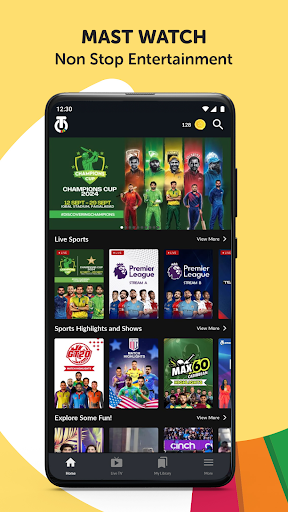
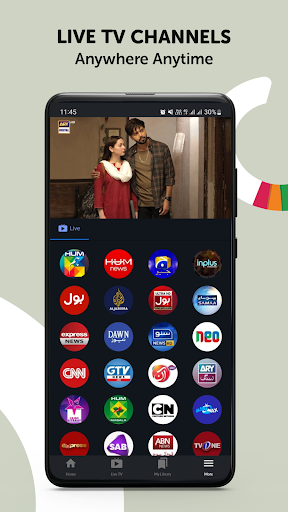
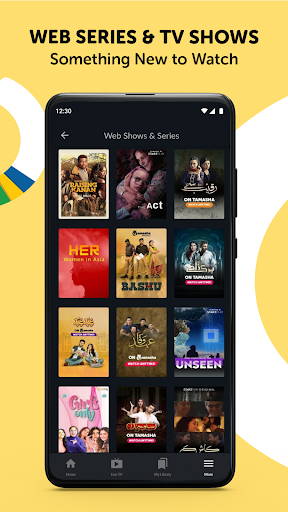
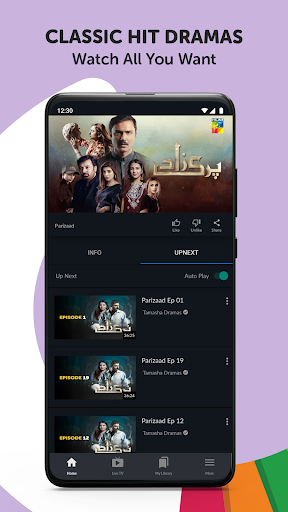
Looking to watch live TV channels, sports highlights, entertainment shows, podcasts, and short-form videos online on the go? Tamasha has all of that and much more. On Tamasha, you can enjoy a wide variety of live TV channels, curated sports content, original digital shows, informative videos, and engaging podcasts all in one seamless streaming experience.
Stream your favorite content on the go with convenience anywhere, anytime. Access content over Wi-Fi as well as mobile data (3G/4G), with a smooth and user-friendly viewing experience designed for all kinds of audiences.
Catalogue of content you can stream on Tamasha:
Live TV Channels:
Enjoy 24/7 live television streaming across news, sports, entertainment, religious, and regional content. Stay connected with global and regional perspectives through trusted networks such as Al Jazeera, DW News, CGTN, PTV Sports, PTV News, and more. From breaking news and sports coverage to cultural and religious programming, Tamasha brings live television together in one place.
Sports Highlights & Shows:
Catch up on the biggest sporting moments with curated highlights, analysis, and sports shows. From international cricket tournaments and franchise leagues to football and other global sporting events, Tamasha delivers key moments and expert insights in an easy-to-watch format.
Entertainment & On-Demand Content:
Explore a growing library of original digital shows, documentaries, interviews, and on-demand videos. Discover stories across culture, lifestyle, education, and entertainment created for modern viewers who want flexible, anytime access.
Podcasts & Talk Shows:
Listen to engaging conversations and thought-provoking discussions across sports, current affairs, lifestyle, technology, and culture. Tamasha brings together creators, experts, and storytellers in one place for meaningful audio-visual content.
Short-Form Video (Tamasha Shots):
Enjoy bite-sized videos featuring highlights, trending moments, sports clips, entertainment content, and user-generated content (UGC), designed for quick and engaging viewing on the go.
Awareness & Informative Content:
Access educational, awareness-driven, and informative content that highlights digital initiatives, social topics, and meaningful stories aimed at informing and inspiring audiences.
That’s not all, here is why you will love Tamasha:
• Hassle-free and quick sign-in process to access content
• 24/7 live TV streaming across multiple categories
• Sports highlights, shows, and global sports coverage
• Podcasts, talk shows, and original digital content
• Short-form videos for quick entertainment on the go
• Easy access to both live and on-demand content in one app
• Smooth streaming experience over Wi-Fi and mobile data
Look no further for your entertainment needs — whether you want live TV, sports highlights, podcasts, or short videos, Tamasha is your all-in-one streaming platform built for global audiences.
Download Tamasha today and start streaming anytime, anywhere.
더보기

1. 설치 프로그램 다운로드 하시고 설치하십시오

2. 미뮤 실행하고 바탕화면에서 구글 플레이 시작

3. 구글 플레이에서 Tamasha: Live TV, Movies 검색
Install
4. Tamasha: Live TV, Movies 다운로드 하시고 설치해 주세요
5. 아이콘 클릭해 주세요

6. Memu Play에서 Tamasha: Live TV, Movies 사용하기
MEmu Play는 5천만 명의 사용자에게 최고의 안드로이드 앱 경험을 제공하는 무료 안드로이드 에뮬레이터입니다. MEmu의 가상화 기술을 통해 최적의 그래픽 성능을 즐기면서 컴퓨터에서 수많은 안드로이드 앱을 원활하게 실행할 수 있습니다.
최상의 그래픽, 큰 스크린, 배터리, 데이터 걱정 완벽하게 해결.
키보드, 마우스 또는 게임패드를 사용하여 쾌적한 게임 플레이가 가능합니다..
미뮤 멀티를 이용하여 여러 개 게임과 앱을 멀티로 사용할 수 있습니다.
다음 절차에 따라 PC에서 Tamasha: Live TV, Movies을(를)플레이 할 수 있습니다.