Bluetooth Priority
업데이트 날짜
현재 버전
2.7.7
제공자

작은 휴대폰 화면에서 앱 사용에 지치셨나요? MEmu Play를 사용하면 큰 화면에서 앱을 경험할 수 있습니다! MEmu Play의 키보드와 마우스 기능은 앱의 숨겨진 잠재력을 깨워줍니다. 컴퓨터에 Bluetooth Priority 앱을 다운로드하고 설치하면 배터리 수명이나 과열 걱정 없이 좋아하는 앱을 즐길 수 있습니다. MEmu Play를 사용하면 컴퓨터에서 앱을 쉽게 사용할 수 있으며, 언제나 고품질 경험을 보장합니다!
더보기
MEmu Play로 PC에서 Bluetooth Priority 을 사용하는 최고의 경험을 즐겨보세요. 강력한 무료 안드로이드 에뮬레이터로, 데스크톱 버전에서 수천 개의 안드로이드 앱을 사용할 수 있습니다. 친구들과 소통하고 더욱 효율적으로 작업물을 다듬어 보세요! Bluetooth Priority Manager puts you in complete control of your Bluetooth connections.
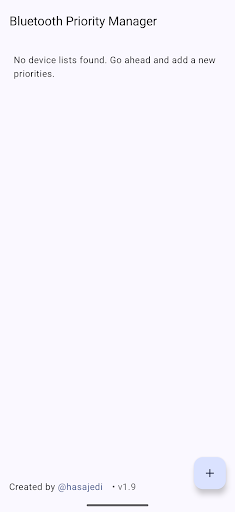
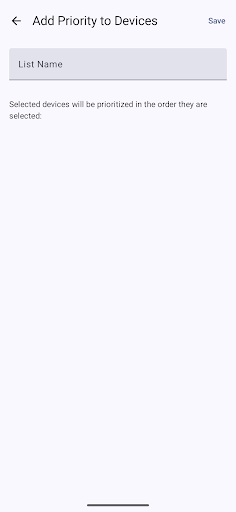
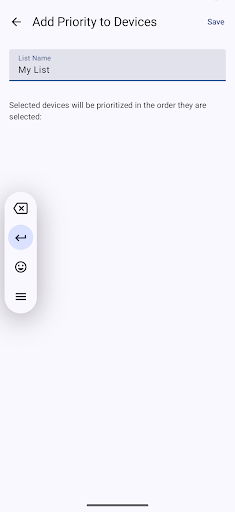
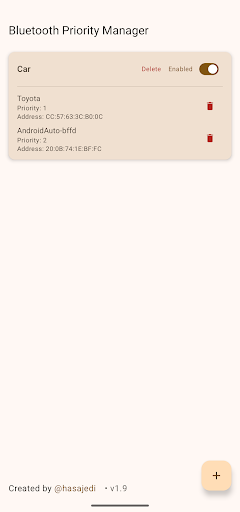
Bluetooth Priority Manager puts you in complete control of your Bluetooth connections. Specify which paired devices should connect first—like your car stereo, earbuds, or speaker—without juggling settings each time. The app runs in the background and automatically manages connections, making it easier than ever to stay linked to your most important devices.
Please Read Before Purchasing:
• Audio switching is not instant – When a new Bluetooth device connects, Android may briefly route audio to it before the app can redirect to your priority device. This typically lasts less than a second.
• Call audio priority is not 100% guaranteed – Some car head units and devices aggressively claim call audio. The app does its best to override this, but results may vary depending on your specific devices.
• These are Android limitations, not app bugs – Android controls initial Bluetooth routing, and we can only react and correct it as fast as possible.
• Try it risk-free – If the app doesn't work well with your devices, send us an email with your Google Play invoice ID within 7 days and we'll issue a full refund.
Key Features:
Custom Device Lists: Create separate lists for home, car, gym—wherever you need quick, automatic connections.
Easy Prioritization: Drag to reorder devices based on importance.
Phone call prioritization: Prioritize phone calls to route to the preferred device in the list.
Hands-Free Monitoring: The app automatically checks connections and reconnects top-priority devices.
Force Reconnect: Instantly reconnect your chosen devices with one tap.
Lightweight & Efficient: Designed to have minimal impact on battery life and performance.
Stop fumbling with your Bluetooth settings—let Bluetooth Priority Manager handle your connections, so you can focus on what matters most.
To best use the app please prioritize only the devices you want the priority to be in, even if you have 10 bluetooth devices you want connected only apply those that are active at a time for example headset and android auto because the logic works only for present devices!
더보기

1. 설치 프로그램 다운로드 하시고 설치하십시오

2. 미뮤 실행하고 바탕화면에서 구글 플레이 시작

3. 구글 플레이에서 Bluetooth Priority 검색
Install
4. Bluetooth Priority 다운로드 하시고 설치해 주세요
5. 아이콘 클릭해 주세요

6. Memu Play에서 Bluetooth Priority 사용하기
MEmu Play는 5천만 명의 사용자에게 최고의 안드로이드 앱 경험을 제공하는 무료 안드로이드 에뮬레이터입니다. MEmu의 가상화 기술을 통해 최적의 그래픽 성능을 즐기면서 컴퓨터에서 수많은 안드로이드 앱을 원활하게 실행할 수 있습니다.
최상의 그래픽, 큰 스크린, 배터리, 데이터 걱정 완벽하게 해결.
키보드, 마우스 또는 게임패드를 사용하여 쾌적한 게임 플레이가 가능합니다..
미뮤 멀티를 이용하여 여러 개 게임과 앱을 멀티로 사용할 수 있습니다.
다음 절차에 따라 PC에서 Bluetooth Priority을(를)플레이 할 수 있습니다.