All HD Video Downloader
업데이트 날짜
현재 버전
1.0
제공자

작은 휴대폰 화면에서 앱 사용에 지치셨나요? MEmu Play를 사용하면 큰 화면에서 앱을 경험할 수 있습니다! MEmu Play의 키보드와 마우스 기능은 앱의 숨겨진 잠재력을 깨워줍니다. 컴퓨터에 All HD Video Downloader 앱을 다운로드하고 설치하면 배터리 수명이나 과열 걱정 없이 좋아하는 앱을 즐길 수 있습니다. MEmu Play를 사용하면 컴퓨터에서 앱을 쉽게 사용할 수 있으며, 언제나 고품질 경험을 보장합니다!
더보기
MEmu Play로 PC에서 All HD Video Downloader 을 사용하는 최고의 경험을 즐겨보세요. 강력한 무료 안드로이드 에뮬레이터로, 데스크톱 버전에서 수천 개의 안드로이드 앱을 사용할 수 있습니다. 친구들과 소통하고 더욱 효율적으로 작업물을 다듬어 보세요! All HD Video Downloader helps you save supported online videos to your device and watch them offline.
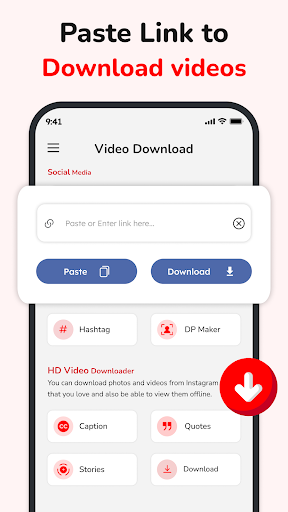
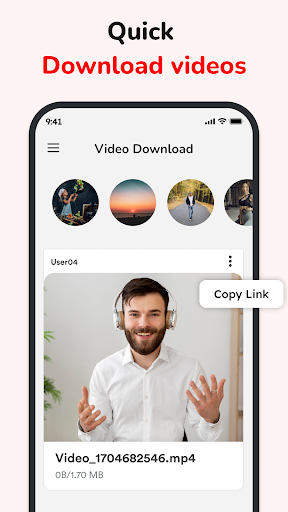
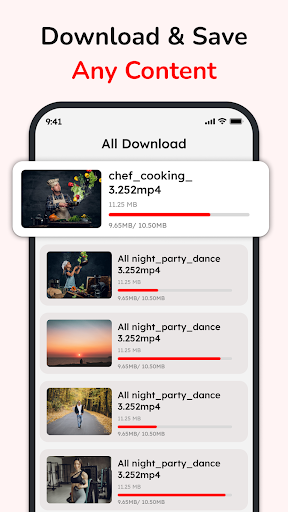

All HD Video Downloader helps you save supported online videos to your device and watch them offline. With a built-in browser, a simple download manager, and an offline video player, everything you need is in one place.
FEATURES
Easy Downloads
• Save supported videos in a few taps
• Choose from available qualities and formats, when offered by the source website
• Stable downloading with pause and resume
Built-in Browser
• Browse supported websites inside the app
• Downloadable media is detected automatically when available
• Paste a supported video link to start a download
Download Manager
• See current and completed downloads in one place
• Pause, resume, or remove downloads
• Track progress and speed in real time
• Continue downloads in the background
Offline Player
• Watch saved videos without an internet connection
• Simple, smooth playback
• Organise and manage your saved files easily
HOW IT WORKS
1. Open the app and browse a supported website, or paste a supported video link.
2. When downloadable media is detected, choose the file you want.
3. Tap Download to save it to your device.
4. Watch it anytime, even without internet.
IMPORTANT INFORMATION
• This is an independent app. It is not affiliated with, endorsed by, or sponsored by any website, platform, or content owner.
• Only download content you own or have permission to download. Please respect copyright and the terms of service of each website.
• Downloading copyrighted content without permission may be against the law.
• Downloads are not available from websites whose terms of service prohibit downloading.
• Download availability and video quality depend on the source website.
• Content owners who want to restrict downloads from their website can contact us, and we will respond promptly.
더보기

1. 설치 프로그램 다운로드 하시고 설치하십시오

2. 미뮤 실행하고 바탕화면에서 구글 플레이 시작

3. 구글 플레이에서 All HD Video Downloader 검색
Install
4. All HD Video Downloader 다운로드 하시고 설치해 주세요
5. 아이콘 클릭해 주세요

6. Memu Play에서 All HD Video Downloader 사용하기
MEmu Play는 5천만 명의 사용자에게 최고의 안드로이드 앱 경험을 제공하는 무료 안드로이드 에뮬레이터입니다. MEmu의 가상화 기술을 통해 최적의 그래픽 성능을 즐기면서 컴퓨터에서 수많은 안드로이드 앱을 원활하게 실행할 수 있습니다.
최상의 그래픽, 큰 스크린, 배터리, 데이터 걱정 완벽하게 해결.
키보드, 마우스 또는 게임패드를 사용하여 쾌적한 게임 플레이가 가능합니다..
미뮤 멀티를 이용하여 여러 개 게임과 앱을 멀티로 사용할 수 있습니다.
다음 절차에 따라 PC에서 All HD Video Downloader을(를)플레이 할 수 있습니다.