AI Astrology: Vedic Guide
업데이트 날짜
현재 버전
1.0.2
제공자

작은 휴대폰 화면에서 앱 사용에 지치셨나요? MEmu Play를 사용하면 큰 화면에서 앱을 경험할 수 있습니다! MEmu Play의 키보드와 마우스 기능은 앱의 숨겨진 잠재력을 깨워줍니다. 컴퓨터에 AI Astrology: Vedic Guide 앱을 다운로드하고 설치하면 배터리 수명이나 과열 걱정 없이 좋아하는 앱을 즐길 수 있습니다. MEmu Play를 사용하면 컴퓨터에서 앱을 쉽게 사용할 수 있으며, 언제나 고품질 경험을 보장합니다!
더보기
MEmu Play로 PC에서 AI Astrology: Vedic Guide 을 사용하는 최고의 경험을 즐겨보세요. 강력한 무료 안드로이드 에뮬레이터로, 데스크톱 버전에서 수천 개의 안드로이드 앱을 사용할 수 있습니다. 친구들과 소통하고 더욱 효율적으로 작업물을 다듬어 보세요! Explore astrology, Tarot, soulmate insights, and self-reflection with AI Astrology: Vedic Guide.
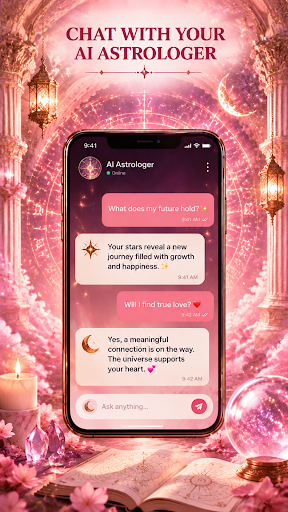
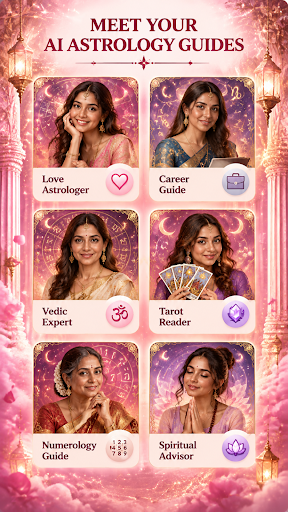
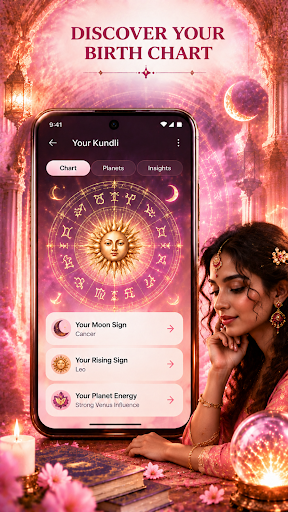
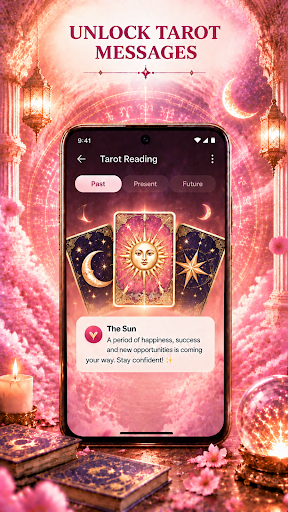
Explore astrology, Tarot, soulmate insights, and self-reflection with AI Astrology: Vedic Guide. Chat with an AI Astrologer about your daily horoscope, draw Tarot cards, explore Tarot messages, discover insights about where you may connect with a future soulmate, and view your Vedic astrology birth chart in one mobile experience.
CHAT WITH AN AI ASTROLOGER
Start a conversation about today’s horoscope and the questions on your mind. Ask about love, relationships, emotions, career, personal goals, or daily themes and receive AI-generated responses designed for entertainment and reflection.
The AI Astrologer is an artificial intelligence experience, not a human astrologer. Responses may be inaccurate and should not be treated as guaranteed predictions or professional advice.
EXPLORE YOUR SOULMATE LOCATION
Curious about where a meaningful connection may begin? Explore a personalized Soulmate Location experience inspired by astrology and the information you provide.
Discover suggested places, regions, or location themes that may be associated with your potential soulmate journey. Use these insights to explore possibilities about where you might meet someone special or what kind of place could play a role in your future relationship.
Soulmate Location results are AI-generated and astrology-inspired. They are intended for entertainment and personal reflection and do not identify the real-time or exact location of any person or guarantee where or when you will meet a soulmate.
DISCOVER YOUR TAROT MESSAGE
Draw Tarot cards and explore the symbols, themes, and messages connected to your reading. Use Tarot as a way to reflect on your thoughts, feelings, relationships, and personal questions from a different perspective.
CHAT ABOUT TAROT
After drawing your cards, continue with the AI Astrologer to explore their meaning. Ask follow-up questions about your Tarot reading and receive AI-generated interpretations based on the conversation.
Tarot interpretations are intended for entertainment and personal reflection and do not guarantee specific future outcomes.
VIEW YOUR VEDIC BIRTH CHART
Enter the required birth details to view the Vedic astrology birth chart available in AI Astrology: Vedic Guide.
Explore chart elements and traditional Vedic astrology themes in a clear, mobile-friendly format. You may encounter concepts such as Janam Kundli, Rashifal, and other astrology information depending on the features and interpretations available in the app.
A DAILY SPACE FOR REFLECTION
Return to your daily horoscope, Soulmate Location insights, Tarot reading, AI conversation, or Vedic birth chart whenever you want to explore another perspective.
AI Astrology: Vedic Guide is designed for entertainment, personal reflection, and astrology exploration. AI-generated responses, soulmate insights, Tarot readings, horoscope information, and Vedic astrology interpretations do not guarantee future events or life outcomes and should not be used as medical, legal, financial, or other professional advice.
Download AI Astrology: Vedic Guide and explore your daily horoscope, soulmate location insights, Tarot messages, AI astrology conversations, and Vedic birth chart.
더보기

1. 설치 프로그램 다운로드 하시고 설치하십시오

2. 미뮤 실행하고 바탕화면에서 구글 플레이 시작

3. 구글 플레이에서 AI Astrology: Vedic Guide 검색
Install
4. AI Astrology: Vedic Guide 다운로드 하시고 설치해 주세요
5. 아이콘 클릭해 주세요

6. Memu Play에서 AI Astrology: Vedic Guide 사용하기
MEmu Play는 5천만 명의 사용자에게 최고의 안드로이드 앱 경험을 제공하는 무료 안드로이드 에뮬레이터입니다. MEmu의 가상화 기술을 통해 최적의 그래픽 성능을 즐기면서 컴퓨터에서 수많은 안드로이드 앱을 원활하게 실행할 수 있습니다.
최상의 그래픽, 큰 스크린, 배터리, 데이터 걱정 완벽하게 해결.
키보드, 마우스 또는 게임패드를 사용하여 쾌적한 게임 플레이가 가능합니다..
미뮤 멀티를 이용하여 여러 개 게임과 앱을 멀티로 사용할 수 있습니다.
다음 절차에 따라 PC에서 AI Astrology: Vedic Guide을(를)플레이 할 수 있습니다.