Together: Moon Escape
업데이트 날짜
현재 버전
제공자

모바일 게임을 좋아하십니까? 작은 핸드폰 화면, 배터리, 발열 이슈로 고민하지 말고 이제 미뮤 앱플레이어로 PC에서 제한없이 모바일 게임을 즐겨보세요! 미뮤 앱플레이어에서 키보드와 마우스를 사용하여 잠자고 있든 프로게이머의 잠재력을 깨워보세요. 컴퓨터에서 다운로드 하시고 Together: Moon Escape 설치하세요. 배터리 걱정, 발열 걱정 필요없이 마음껏 즐길수 있습니다; 미뮤 멀티로 무장하여 모바일 게임을 한층 더 재미있게 플레이할 수 있습니다!
더보기
PC에서 미뮤로 Together: Moon Escape 다운로드 하시고 큰 화면으로 플레이 즐기자 A Fresh Take on Co-Op GamingAt a time when co-op games explore all kinds of fast-paced and experimental ideas, Together Moon Escape offers a different kind of experience.
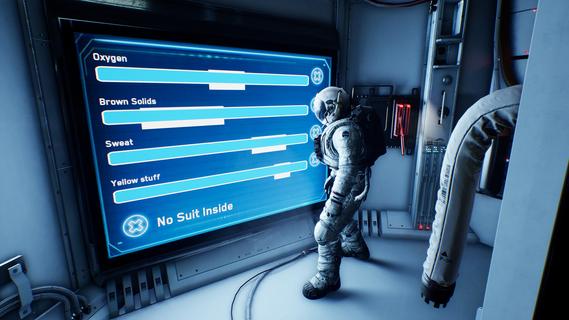

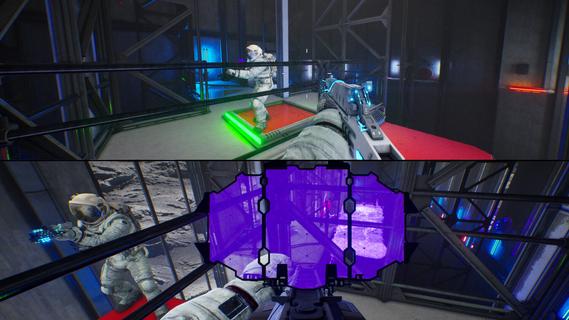

A Fresh Take on Co-Op GamingAt a time when co-op games explore all kinds of fast-paced and experimental ideas, Together Moon Escape offers a different kind of experience.This is a carefully crafted, story-driven, two-player puzzle adventure designed from the ground up for meaningful cooperation. Every puzzle is intentional. Every mechanic serves the narrative. Every moment is built to make you communicate, think, and feel.If you love the asymmetric design of We Were Here and the emotional cooperation of It Takes Two, you donât want to miss this lunar journey!Welcome to the MoonYou are Moonfishers, specialized astronauts sent to the Moon. Your employer? Moontella. A trillionare corporation extracting rare (and questionably carcinogenic) lunar slimes to supply high-end restaurants back on Earth. The job was simple. Until something went wrong.This is not your average serious space game. Expect absurd tools, ridiculous logic, and nonstop cooperation. Whether you're arguing over a puzzle or laughing at your partner falling into a crater (again), youâll need each other to get home.Features2-player online or local co-op â Grab a friend and play split-screen or over the internet. No solo mode: the Moon demands teamwork.True co-op puzzles â Communication is key! Youâll each see different things, control different systems, or need to act in perfect sync.Lunar exploration â Travel across varied environments like the Moonâs surface, dark caves, derelict ships, and secret facilities.Ridiculous tools â Use special weapons and gadgets like the Slime Fryer or the Slime Vision Goggles to solve puzzles... or prank your partner.
더보기

1. 설치 프로그램 다운로드 하시고 설치하십시오

2. 미뮤 실행하고 바탕화면에서 구글 플레이 시작

3. 구글 플레이에서 Together: Moon Escape 검색
Install
4. Together: Moon Escape 다운로드 하시고 설치해 주세요
5. 아이콘 클릭해 주세요

6. 미뮤 앱플레이어로 실행
미뮤 앱플레이어는 무료 안드로이드 에뮬레이터로 5천만명의 유저들에게 최고의 안드로이드 게임 환경을 제공하고 있습니다. 미뮤의 가상화 기술은 수많은 안드로이드 게임을 PC에서 원활하게 구동함과 동시에 최고의 그래픽 퍼포먼스를 느낄수 있습니다.
최상의 그래픽, 큰 스크린, 배터리, 데이터 걱정 완벽하게 해결.
키보드, 마우스 또는 게임패드를 사용하여 쾌적한 게임 플레이가 가능합니다..
미뮤 멀티를 이용하여 여러 개 게임과 앱을 멀티로 사용할 수 있습니다.
다음 절차에 따라 PC에서 Together: Moon Escape을(를)플레이 할 수 있습니다.