eCricket
업데이트 날짜
현재 버전
제공자

모바일 게임을 좋아하십니까? 작은 핸드폰 화면, 배터리, 발열 이슈로 고민하지 말고 이제 미뮤 앱플레이어로 PC에서 제한없이 모바일 게임을 즐겨보세요! 미뮤 앱플레이어에서 키보드와 마우스를 사용하여 잠자고 있든 프로게이머의 잠재력을 깨워보세요. 컴퓨터에서 다운로드 하시고 eCricket 설치하세요. 배터리 걱정, 발열 걱정 필요없이 마음껏 즐길수 있습니다; 미뮤 멀티로 무장하여 모바일 게임을 한층 더 재미있게 플레이할 수 있습니다!
더보기
PC에서 미뮤로 eCricket 다운로드 하시고 큰 화면으로 플레이 즐기자 eCricket lets players compete in real-time multiplayer matches, rise through global leaderboards, and participate in live esports tournaments designed for both aspiring players and seasoned professionals.


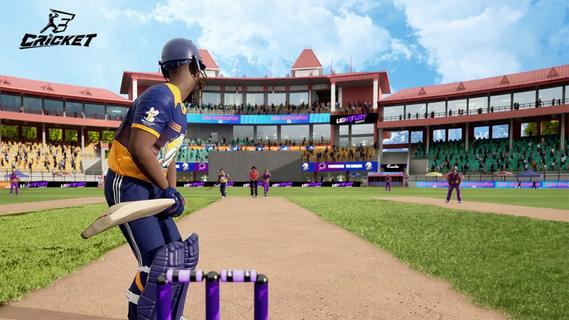
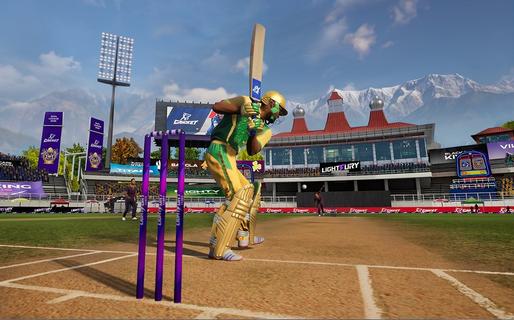
eCricket lets players compete in real-time multiplayer matches, rise through global leaderboards, and participate in live esports tournaments designed for both aspiring players and seasoned professionals. With fast-paced action and deep tactical gameplay, eCricket blends the intensity of cricket with the thrill of competitive gaming.Multiplayer cricket battlesJump straight into high-adrenaline, real-time matches and face off against cricket fans from across the globe in thrilling multiplayer showdowns. Every ball is live, every shot is a split-second decision, and every over demands sharp reflexes and smart tactics. Whether youâre playing short, explosive games or full-length battles, no two matches ever feel the same, keeping the competition fresh, skill-based, and endlessly replayable.Advanced AI and nextâgen gameplay mechanicsFeel the difference as eCricketâs advanced AI learns how you play and pushes back with smarter, more realistic match situations. Nextâgen mechanics let you unleash precise shots, deceptive bowling variations, and tactical field changes with intuitive controls. The more you play, the deeper the game becomes, striking a perfect balance between easy-to-pick-up fun and high-level mastery for serious competitors.Immersive graphics powered by Unreal Engine 5Step into beautifully rendered stadiums brought to life with Unreal Engine 5âs cuttingâedge visuals. From the texture of the pitch to the movement of the crowd and the lighting under a night sky, every detail is crafted to feel like real cricket. Lifelike player models and smooth animations make every drive, yorker, and celebration look and feel authentic, pulling you deeper into the atmosphere of the match.Global esports tournaments and competitive rankingsJoin a global stage where your performance truly matters. Compete in official esports tournaments, climb through international rankings, and prove your skills against the worldâs best players. Earn recognition as you rise through the tiers, unlock prestige by winning events, and turn every match into a chance to showcase your talent in a structured, high-stakes competitive ecosystem.Built for casual fans and esports prosWhether you just love cricket or live for competitive play, eCricket is built for you. Jump into fast, fun matches with simple controls and flexible modes, or dive deeper into advanced systems, tactics, and ranked play as you improve. Scalable difficulty, smart onboarding, and rich competitive features make it an inclusive arena where newcomers can enjoy the game and serious players can grind, optimize, and dominate.How to play eCricket on AndroidReady to start your innings on mobile? Playing eCricket on Android is quick and simple. Just install the game, sign in, and jump into your preferred mode - whether youâre in the mood for a fast Quick Match, a Single Player session, or a full-on Multiplayer battle. Within minutes, youâll be batting, bowling, and competing in high-intensity cricket matches right from your phone.Download and install eCricket APK latest version from APKPure.Launch eCricket and log in using your registered email or account.Complete the initial setup and follow the tutorial to learn the basics.From the main menu, select Quick Match, Single Player, or Multiplayer.Follow the on-screen controls and start your first match.Get Started with eCricketBe among the first to experience the next era of cricket gaming. eCricket early access is live, giving you an exclusive preview of its competitive, high-fidelity gameplay before the worldwide launch. Register on the official website to lock in your early access and step onto the pitch ahead of the crowd. Then pre-register for eCricket on APKPure to receive instant alerts when new builds and the full release go live, so you never miss a single update - or a single ball.
더보기

1. 설치 프로그램 다운로드 하시고 설치하십시오

2. 미뮤 실행하고 바탕화면에서 구글 플레이 시작

3. 구글 플레이에서 eCricket 검색
Install
4. eCricket 다운로드 하시고 설치해 주세요
5. 아이콘 클릭해 주세요

6. 미뮤 앱플레이어로 실행
미뮤 앱플레이어는 무료 안드로이드 에뮬레이터로 5천만명의 유저들에게 최고의 안드로이드 게임 환경을 제공하고 있습니다. 미뮤의 가상화 기술은 수많은 안드로이드 게임을 PC에서 원활하게 구동함과 동시에 최고의 그래픽 퍼포먼스를 느낄수 있습니다.
최상의 그래픽, 큰 스크린, 배터리, 데이터 걱정 완벽하게 해결.
키보드, 마우스 또는 게임패드를 사용하여 쾌적한 게임 플레이가 가능합니다..
미뮤 멀티를 이용하여 여러 개 게임과 앱을 멀티로 사용할 수 있습니다.
다음 절차에 따라 PC에서 eCricket을(를)플레이 할 수 있습니다.