Time Cut : Smooth Slow Motion
업데이트 날짜
현재 버전
2.6.0
제공자

작은 휴대폰 화면에서 앱 사용에 지치셨나요? MEmu Play를 사용하면 큰 화면에서 앱을 경험할 수 있습니다! MEmu Play의 키보드와 마우스 기능은 앱의 숨겨진 잠재력을 깨워줍니다. 컴퓨터에 Time Cut : Smooth Slow Motion 앱을 다운로드하고 설치하면 배터리 수명이나 과열 걱정 없이 좋아하는 앱을 즐길 수 있습니다. MEmu Play를 사용하면 컴퓨터에서 앱을 쉽게 사용할 수 있으며, 언제나 고품질 경험을 보장합니다!
더보기
PC에서 미뮤로 Time Cut : Smooth Slow Motion 다운로드 하시고 큰 화면으로 플레이 즐기자 Using advanced image processing algorithm - Optical Flow and deep-learning RIFE model, Time Cut is a professional slopro video editor that is dedicated to change the speed of a velomingo video or timefreeze it, make a very smooth action & slow motion, with motion interpolation technique.
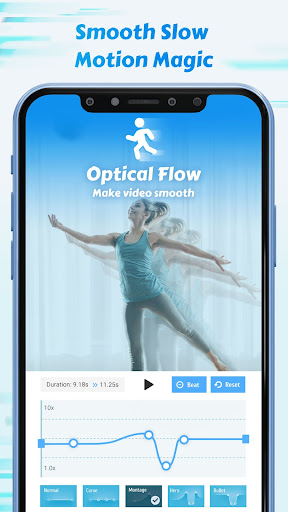
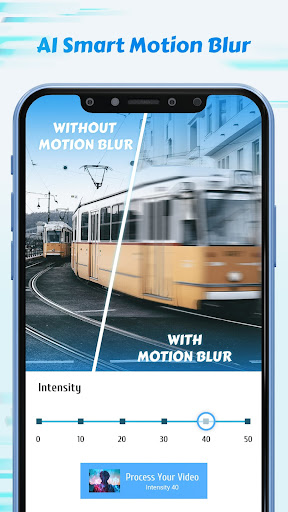
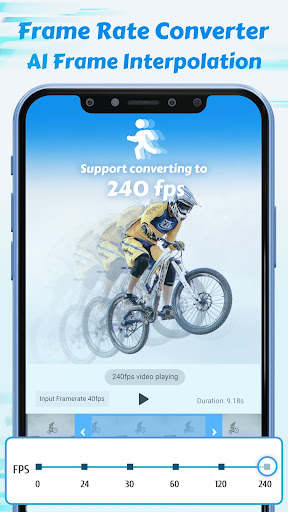
Using advanced image processing algorithm - Optical Flow and deep-learning RIFE model, Time Cut is a professional slopro video editor that is dedicated to change the speed of a velomingo video or timefreeze it, make a very smooth action & slow motion, with motion interpolation technique. It can also make motion blur fx, convert video frame rate, like Twixtor & RSMB plugin on PC.
Do you want to make a smooth slow and fast motion velomingo video with no lag or turn your videos into HFR (high frame rate)? Does your phone camera support recording slow mo videos like an iPhone camera does? Do you want to make a velocity edit and freeze time at certain moments? Do you need free twixtor effect to slow down a clip,or do you want motion blur fx like RSMB After Effects plugin? Time Cut video speed changer & framerate converter will help!
This app can calculate additional video frames to make ultra slopro smooth videos even if you slow motion a normal 30 fps video. We also offer a wide range of carefully designed velomingo slowmo effects and camera lenta that make it easy to highlight your favorite moments in the node video.
#Speed Curve & Smooth Slow Motion Editor
As an advanced speed changer for smooth action cam, like VSCO trending video effects. Our free video speed adjustment feature allows you to make any flexible velocity edits to your video node, including customized speed curve, time freezer and a variety of common speed change presets. For example, you can speed it up and then slow it down, and your camera lenta video will always stay smooth even after being slowed down . By speeding up continuous picture frames, you can make amazing hyperlapse or timelapse videos.
You are also able to choose the simple normal mode and select your ultra slow-motion speed up to 1/10x or fast motion - video acceleration up to 10x. With video filters and music added, you can create incredible slomo or timeplase videos.
# Motion Blur Effects Using Optical Flow
Create high quality cool motion blur effects like RSMB plugin on PC to enhance your video performance. Our motion blur fx also uses optical flow method to achieve vsmb results. We also offer many more blur options like BCC lens blur and directional blur etc.
#Frame Rate Converter
In addition to increasing the frame rate of normal videos to 60/120/240 fps, it can also convert high frame rate videos into cinematic 24fps videos and 30fps videos of smaller size to share. When you slow down high frame rate videos, the result will be smoother than normal slomo videos without any stutter or ""lag"". When you turn a hfr video into lower framerates, the size will be smaller and easy to save and share.The app supports dealing with videos from 1 to 240 fps, which mean videos taken by go pro, action cam, drone and smartphone of all types.
#Quality Enhancer
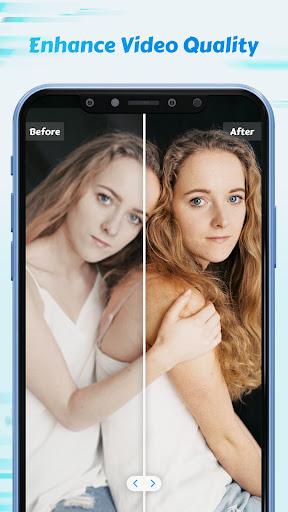
Wanna good-quality video to take the edits to the next level? We offer AI-driven HD quality enhancer to enhance the quality of both pictures and videos.
#Highlight Moments Fx
There're all kinds of slow motion effects available in our app to help you make creative velomingo edits in an easy way regardless of your editing skills. There are only two steps: first, select a highlight moment fx you like; second, choose the start moment. You'll get a video including all kinds of effects, such as glitter, Zoom or flashy lights, and also VSCO like filters, and then you can check it out in our video player. If you add music that can match the movement and the beat, it will be a viral dance video on TikTok and on Instagram Boomerang and Insta Reels.
A few ideas for where you can use our app:
-slow down and capture the jumping moment when you jump high
-slowmo your amazing hd clip of every game replay and share it on Youtube and Twitch
-make free smooth dance velocity edits with node video editor for Tik Tok and Instagram Reels
-make a fun quick and slow video clip and turn it into a Gif to send on Whatsapp
Download Time Cut and play with time!
더보기

1. 설치 프로그램 다운로드 하시고 설치하십시오

2. 미뮤 실행하고 바탕화면에서 구글 플레이 시작

3. 구글 플레이에서 Time Cut : Smooth Slow Motion 검색
Install
4. Time Cut : Smooth Slow Motion 다운로드 하시고 설치해 주세요
5. 아이콘 클릭해 주세요

6. Memu Play에서 Time Cut : Smooth Slow Motion 사용하기
MEmu Play는 5천만 명의 사용자에게 최고의 안드로이드 앱 경험을 제공하는 무료 안드로이드 에뮬레이터입니다. MEmu의 가상화 기술을 통해 최적의 그래픽 성능을 즐기면서 컴퓨터에서 수많은 안드로이드 앱을 원활하게 실행할 수 있습니다.
최상의 그래픽, 큰 스크린, 배터리, 데이터 걱정 완벽하게 해결.
키보드, 마우스 또는 게임패드를 사용하여 쾌적한 게임 플레이가 가능합니다..
미뮤 멀티를 이용하여 여러 개 게임과 앱을 멀티로 사용할 수 있습니다.
다음 절차에 따라 PC에서 Time Cut : Smooth Slow Motion을(를)플레이 할 수 있습니다.