Baby Monitor PC

Baby Monitor PC 다운로드

Baby Monitor PC

Baby Monitor

  • 업데이트 날짜

  • 현재 버전

    11.16

  • 제공자

    Baby Monitor PC

PC에서 Baby Monitor 의 특징

작은 휴대폰 화면에서 앱 사용에 지치셨나요? MEmu Play를 사용하면 큰 화면에서 앱을 경험할 수 있습니다! MEmu Play의 키보드와 마우스 기능은 앱의 숨겨진 잠재력을 깨워줍니다. 컴퓨터에 Baby Monitor 앱을 다운로드하고 설치하면 배터리 수명이나 과열 걱정 없이 좋아하는 앱을 즐길 수 있습니다. MEmu Play를 사용하면 컴퓨터에서 앱을 쉽게 사용할 수 있으며, 언제나 고품질 경험을 보장합니다!

더보기

Baby Monitor PC 스크린샷 & 비디오

PC에서 미뮤로 Baby Monitor 다운로드 하시고 큰 화면으로 플레이 즐기자 Baby Monitor helping you in listening your baby when you are away.
신청 정보

Baby Monitor helping you in listening your baby when you are away.
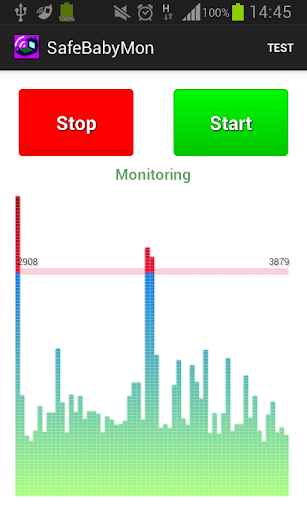


Baby Monitor detects if baby cries and notifies you via regular call.


How to use

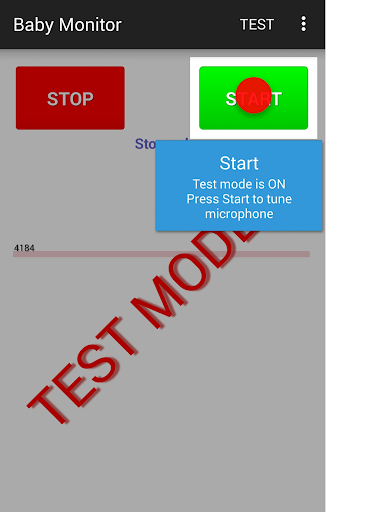
Turn on Test mode - use menu Test.
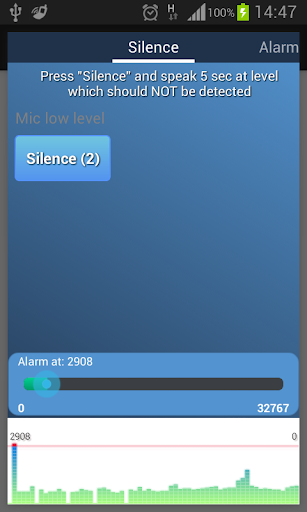
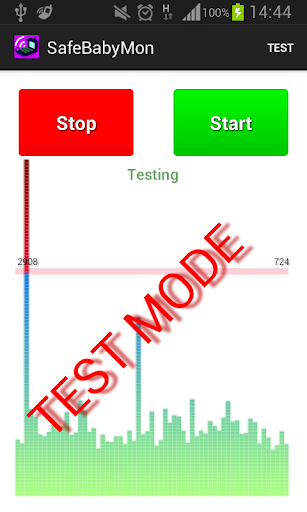
Press START button - you should see noise bars at the bottom.
Pay attention to horizontal red line - that is the alarm level.
BabyMonitor notifies you if the noise bars crossed that line several times.
Move that horizontal red line up and down to change the alarm level.
Turn off Test mode - use menu Test again.
Specify phone numbers for notification - use menu Settings, Call phones.
Put the phone on a distance to the baby, position a microphone in the direction of the child, press START button and you can leave the room.

Key features
- No ads
- You can specify multiple contacts for calls
- Continuous monitoring
- Regular call if battery is getting low
- Customized microphone sensitivity
- Microphone calibration wizard
- Silent incoming calls so as not to wake the baby
- Low battery consumption
- Runs in the background, even when the device screen is off
- Delay before start gives you time to leave the room
- Auto recovery from temporary problems of mobile network
- You can specify SIM slot number (may not work on some models)
- You can send child phone mic level to the parent phone. Install baby monitor on two phones. In the child's phone settings, check 'Experimental', check 'Enable Internet data sending', check 'This is the child phone', click on 'This phone id' and send copied Id to the parent phone using any messenger. Click the main Start button to start monitoring.
In the parent phone settings, check 'Experimental', check 'Enable Internet data sending', check 'This is the parent phone', click on 'Child phone id' and paste child phone Id from messenger. Click the main Start button to start getting data from the child phone.
You can use several parent phones.

Tips
- Baby Monitor does not require Wi-Fi network or mobile data
- You can use any kind of phone to get Baby Monitor regular calls
- Make sure that
- The selected microphone level will trigger an alarm at a distance from the child, but will not trigger on any background noises
- The phone has a good battery level or charging
- Mobile network signal is good and stable
- You do not need to choose SIM card or anything else manually when you are doing a normal call
- BabyMonitor is still running after 30 min of phone sleep mode and background activity for BabyMonitor is allowed in phone settings
- It is better to put and test phone within 2 meters
- It is better to make sure that you get the alarm calls several times
- It is better to not leave baby alone for a long time, Baby Monitor can not replace a real nanny. This application is designed to help you with your babysitting. It is not a substitute for real human care.

If you like the BabyMonitor application, please review it on Google Play.
Please feel free to contact us at faebir.sbm@gmail.com if you have any questions, feedback, ideas or issues.
You can visit http://faebir.weebly.com for additional information.

더보기

PC에 Baby Monitor 다운로드

  • Baby Monitor PC

    1. 설치 프로그램 다운로드 하시고 설치하십시오

  • Baby Monitor PC

    2. 미뮤 실행하고 바탕화면에서 구글 플레이 시작

  • Baby Monitor PC

    3. 구글 플레이에서 Baby Monitor 검색

  • Baby Monitor PC Install

    4. Baby Monitor 다운로드 하시고 설치해 주세요

  • Baby Monitor PC

    5. 아이콘 클릭해 주세요

  • Baby Monitor PC
    Baby Monitor PC Baby Monitor PC

    6. Memu Play에서 Baby Monitor 사용하기

MEmu Play를 선택해야 하는 이유?

MEmu Play는 5천만 명의 사용자에게 최고의 안드로이드 앱 경험을 제공하는 무료 안드로이드 에뮬레이터입니다. MEmu의 가상화 기술을 통해 최적의 그래픽 성능을 즐기면서 컴퓨터에서 수많은 안드로이드 앱을 원활하게 실행할 수 있습니다.

  • 최상의 그래픽, 큰 스크린, 배터리, 데이터 걱정 완벽하게 해결.

  • 키보드, 마우스 또는 게임패드를 사용하여 쾌적한 게임 플레이가 가능합니다..

  • 미뮤 멀티를 이용하여 여러 개 게임과 앱을 멀티로 사용할 수 있습니다.

사용할 준비가 되셨나요?

인기 카테고리

Baby Monitor - FAQs

  • PC에서 Baby Monitor을(를) 플레이 하는 방법?

    다음 절차에 따라 PC에서 Baby Monitor을(를)플레이 할 수 있습니다.
    • 미뮤 PC 앱플레이어를 다운로드하세요.Baby Monitor 검색하세요.
    • 구글 플레이 스토어 로그인 후 Baby Monitor 검색하세요.
    • Baby Monitor 설치 후 실행하여 플레이
  • Baby Monitor PC 최소 요구 사양?
    • OS: 마이크로소프트 윈도우 7 이상
    • 프로세서: Intel 또는 AMD 프로세서
    • OpenGL 2.0을 탑재한 Windows DirectX 11 / Graphic 드라이버
    • 하드웨어 가상화 기술(Intel VT-x/AMD-V)을 사용하도록 설정
    • 2GB RAM(x64 시스템의 경우 4GB) 이상
    • 5GB의 하드 디스크 여유 공간
    • HDD: 5GB의 여유 디스크 공간.