ARLOOPA: AR Camera 3D Scanner
업데이트 날짜
현재 버전
1794391060
제공자

작은 휴대폰 화면에서 앱 사용에 지치셨나요? MEmu Play를 사용하면 큰 화면에서 앱을 경험할 수 있습니다! MEmu Play의 키보드와 마우스 기능은 앱의 숨겨진 잠재력을 깨워줍니다. 컴퓨터에 ARLOOPA: AR Camera 3D Scanner 앱을 다운로드하고 설치하면 배터리 수명이나 과열 걱정 없이 좋아하는 앱을 즐길 수 있습니다. MEmu Play를 사용하면 컴퓨터에서 앱을 쉽게 사용할 수 있으며, 언제나 고품질 경험을 보장합니다!
더보기
MEmu Play로 PC에서 ARLOOPA: AR Camera 3D Scanner 을 사용하는 최고의 경험을 즐겨보세요. 강력한 무료 안드로이드 에뮬레이터로, 데스크톱 버전에서 수천 개의 안드로이드 앱을 사용할 수 있습니다. 친구들과 소통하고 더욱 효율적으로 작업물을 다듬어 보세요! ARLOOPA is an augmented reality and virtual reality app which provides advanced AR services that lets people impose digital content (images, sounds, text) over a real-world environment.
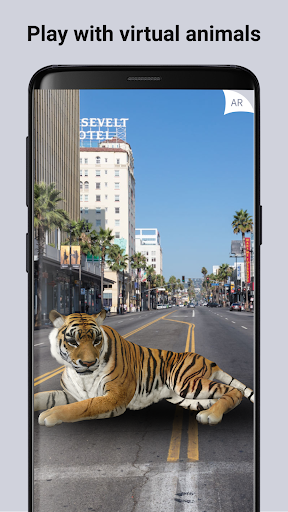
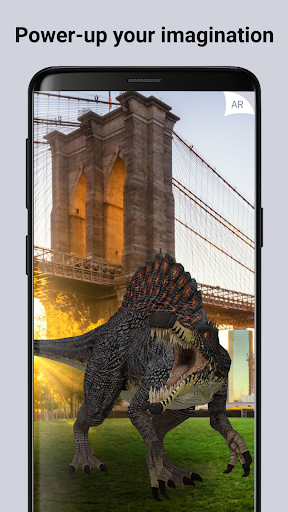
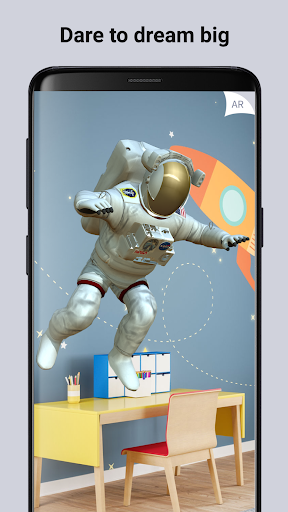
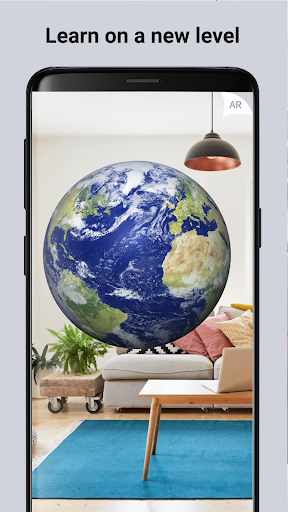
ARLOOPA is an augmented reality and virtual reality app which provides advanced AR services that lets people impose digital content (images, sounds, text) over a real-world environment. Take your Augmented reality camera and make AR magic with amazing gifs and emojis. Place and preview augmented reality furniture, art or even robots and cars models in your home with 3D effects. Take 3D videos, photos, play with AR 3D wild animals like dinosaurs, sharks and dragons. Use your augmented reality camera to create your own virtual reality with 3D animation: 3D sky, moon and other science models. Scale the 3D augmented reality models in your camera to make them lifesize. AR is about to become a part of everyday life. With Arloopa you will appear in a colorful and imaginative world.
The easiest way to experience augmented reality is with the camera of your smartphone or tablet. AR Scanner activates the camera, the program calculates the perspective and applies a digital layer to it. Our AR Scanner application can transfer any digital information to the real world very easily. A whole new experience and interaction with the venue awaits you with a simple magic scan. Arloopa will help you create 3D models for 3D printing. It’s quite easy to choose and scan an object or a person. Animate any models from your surroundings and make 3D memories.
Arloopa gives you the possibility to take photos and videos of different objects and generate a 3D model of any object, room, or even an outdoor space. Create a magic plan with hundreds of hyper realistic 3D AR models from the app models store and transform your home into a virtual-art studio. Unify many augmented reality models in one scene in your camera view to create a concept digital world. Use the app AR scanner to capture augmented reality markers and stream or reveal hidden reality. Bring artworks to life with amazing digital effects. Get access to virtual content in your location. Use augmented reality portals to travel to metaverses and meet AR robots, different wild animals and digital humans. Capture your experiences and share with the world with 3D magic photos and videos. You can also view objects in Mixed Reality with Google Cardboard or Virtual Reality glasses.
In our app you can find amazing AR filters and effects that are designed to be applied to real images. AR filters always will help you to stay active and entertain yourself.
DISCOVER THE MAGIC
Find hidden content by scanning markers and objects with the app using your phone camera. If you need inspiration, you have a gallery with hundreds of images, as well as having the possibility of discovering new brands and furniture designers. You can also revive artworks, murals, catalogs and brochures. Magic AR presents enormous possibilities and can change the future in many aspects of our lives.
CREATE 3D SCENES
Combine multiple 3D models in one augmented reality scene to make interactive digital experiences. For instance, create a virtual zoo with wildlife, using AR animals like tiger, lion and elephant. Capture photos and videos of your experiences and share with friends on social
AR PLATFORM FEATURES
AR scanner
3D models library
Location-based augmented reality AR
Mixed Reality
Social sharing – photo, video, GIF media.
LOCATION-BASED AR
Add your content to a specific place in the real world or discover other people’s hidden content in your location. You can add photos, videos, audio and 3D models.
ARLOOPA is the best alternative to Aurasma. The app offers a ready-made 3D models library, which you can use to combine 3D models and create different AR scenarios. We work with individuals, brands, creative advertising agencies, museums, schools and cities to make your everyday life filled with new content and visual experiences, educational and entertaining AR discoveries. If you are interested in our product and you want to buy it, you can contact us.
더보기

1. 설치 프로그램 다운로드 하시고 설치하십시오

2. 미뮤 실행하고 바탕화면에서 구글 플레이 시작

3. 구글 플레이에서 ARLOOPA: AR Camera 3D Scanner 검색
Install
4. ARLOOPA: AR Camera 3D Scanner 다운로드 하시고 설치해 주세요
5. 아이콘 클릭해 주세요

6. Memu Play에서 ARLOOPA: AR Camera 3D Scanner 사용하기
MEmu Play는 5천만 명의 사용자에게 최고의 안드로이드 앱 경험을 제공하는 무료 안드로이드 에뮬레이터입니다. MEmu의 가상화 기술을 통해 최적의 그래픽 성능을 즐기면서 컴퓨터에서 수많은 안드로이드 앱을 원활하게 실행할 수 있습니다.
최상의 그래픽, 큰 스크린, 배터리, 데이터 걱정 완벽하게 해결.
키보드, 마우스 또는 게임패드를 사용하여 쾌적한 게임 플레이가 가능합니다..
미뮤 멀티를 이용하여 여러 개 게임과 앱을 멀티로 사용할 수 있습니다.
다음 절차에 따라 PC에서 ARLOOPA: AR Camera 3D Scanner을(를)플레이 할 수 있습니다.