Luna Controller
업데이트 날짜
현재 버전
1.1.802.0-release
제공자

작은 휴대폰 화면에서 앱 사용에 지치셨나요? MEmu Play를 사용하면 큰 화면에서 앱을 경험할 수 있습니다! MEmu Play의 키보드와 마우스 기능은 앱의 숨겨진 잠재력을 깨워줍니다. 컴퓨터에 Luna Controller 앱을 다운로드하고 설치하면 배터리 수명이나 과열 걱정 없이 좋아하는 앱을 즐길 수 있습니다. MEmu Play를 사용하면 컴퓨터에서 앱을 쉽게 사용할 수 있으며, 언제나 고품질 경험을 보장합니다!
더보기
MEmu Play로 PC에서 Luna Controller 을 사용하는 최고의 경험을 즐겨보세요. 강력한 무료 안드로이드 에뮬레이터로, 데스크톱 버전에서 수천 개의 안드로이드 앱을 사용할 수 있습니다. 친구들과 소통하고 더욱 효율적으로 작업물을 다듬어 보세요! The Luna Controller app allows you to set up and manage your Luna Controllers and play Luna games using your phone via the Phone Controller.
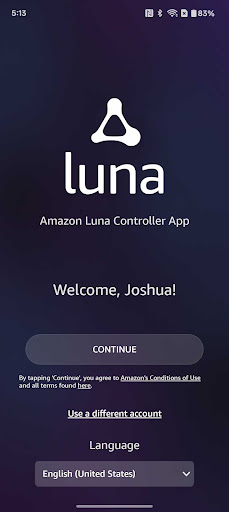
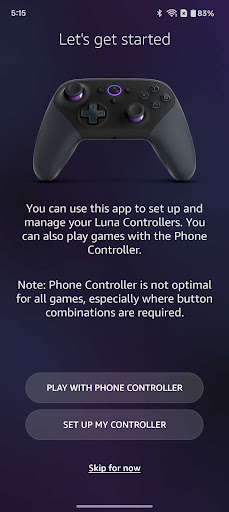
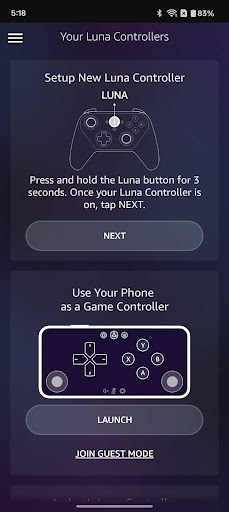
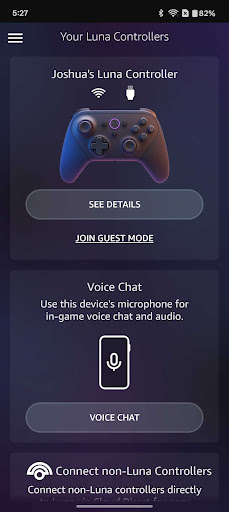
The Luna Controller app allows you to set up and manage your Luna Controllers and play Luna games using your phone via the Phone Controller.
With the Luna Controller app you can:
- Register Luna Controllers to your Amazon account
- Set up your Luna Controller to connect to wifi and enable Cloud Direct
- Play games on Luna using touch inputs on your mobile device using the Phone Controller
- Add friends to your local Luna gaming session using Guest Mode
- Manage the Cloud Direct wifi connection
- Manage your Luna Controller Bluetooth connection
- Update the software on your Luna Controllers
- Check battery status
- Switch between Cloud Direct and Bluetooth
- Get help for common troubleshooting problems
To set up the Luna Controller:
1. Download and install the Luna Controller app on your mobile device.
2. Power up your Luna Controller with 2 AA batteries. Press and hold the Luna button for 3 seconds, and an orange light will start spinning
3. Open the Luna Controller app and follow the on-screen instructions
To set up a Luna Phone Controller:
No controller? No problem. You can use your phone to play Luna games.
1. Go to the appstore on your mobile device and install the Luna Controller app.
2. Sign into your Amazon account.
3. Select Play With Phone Controller.
The next time you're ready to play, just follow these steps:
1. Open the Luna app on a compatible device, such as a compatible Fire TV, PC or Mac
2. Open the Luna Controller app on your mobile device.
3. Select Launch under your virtual controller and wait for your controller to connect to Luna.
4. Use the virtual controller to select the game you want to play and launch it.
Guests can also download the Luna Controller app and join in on the gameplay.
By using this app, you agree to Amazon’s Conditions of Use (www.amazon.com/conditionsofuse) and Privacy Notice (www.amazon.com/privacy).
더보기

1. 설치 프로그램 다운로드 하시고 설치하십시오

2. 미뮤 실행하고 바탕화면에서 구글 플레이 시작

3. 구글 플레이에서 Luna Controller 검색
Install
4. Luna Controller 다운로드 하시고 설치해 주세요
5. 아이콘 클릭해 주세요

6. Memu Play에서 Luna Controller 사용하기
MEmu Play는 5천만 명의 사용자에게 최고의 안드로이드 앱 경험을 제공하는 무료 안드로이드 에뮬레이터입니다. MEmu의 가상화 기술을 통해 최적의 그래픽 성능을 즐기면서 컴퓨터에서 수많은 안드로이드 앱을 원활하게 실행할 수 있습니다.
최상의 그래픽, 큰 스크린, 배터리, 데이터 걱정 완벽하게 해결.
키보드, 마우스 또는 게임패드를 사용하여 쾌적한 게임 플레이가 가능합니다..
미뮤 멀티를 이용하여 여러 개 게임과 앱을 멀티로 사용할 수 있습니다.
다음 절차에 따라 PC에서 Luna Controller을(를)플레이 할 수 있습니다.