AI Video Generator - Vezo AI
업데이트 날짜
현재 버전
5.6
제공자

작은 휴대폰 화면에서 앱 사용에 지치셨나요? MEmu Play를 사용하면 큰 화면에서 앱을 경험할 수 있습니다! MEmu Play의 키보드와 마우스 기능은 앱의 숨겨진 잠재력을 깨워줍니다. 컴퓨터에 AI Video Generator - Vezo AI 앱을 다운로드하고 설치하면 배터리 수명이나 과열 걱정 없이 좋아하는 앱을 즐길 수 있습니다. MEmu Play를 사용하면 컴퓨터에서 앱을 쉽게 사용할 수 있으며, 언제나 고품질 경험을 보장합니다!
더보기
MEmu Play로 PC에서 AI Video Generator - Vezo AI 을 사용하는 최고의 경험을 즐겨보세요. 강력한 무료 안드로이드 에뮬레이터로, 데스크톱 버전에서 수천 개의 안드로이드 앱을 사용할 수 있습니다. 친구들과 소통하고 더욱 효율적으로 작업물을 다듬어 보세요! ONE APP.
ONE APP. ALL THE AI.
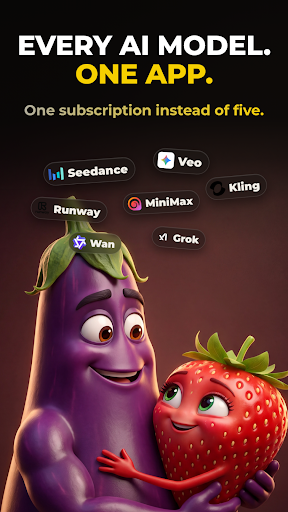
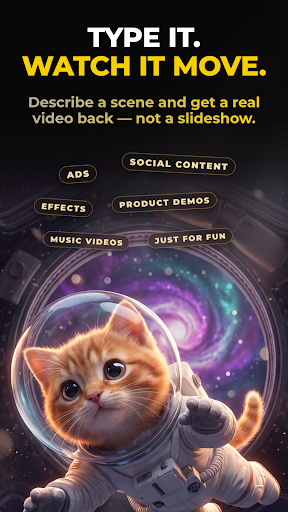
Vezo brings the world's most powerful AI models together in a single app. Type an idea and watch it become a cinematic video, a stunning image, or a complete song with real vocals. There's nothing to learn — you describe, Vezo creates. Whether you're making content for TikTok, Reels and YouTube, designing visuals for your brand, or writing a song for someone you love, it all happens in one place, with one credit balance, in minutes.
Most AI apps lock you into a single model. Vezo gives you the full roster of today's leading AI engines — and when a new model drops, it lands in Vezo right away.
AI VIDEO — EVERY TOP MODEL
Turn plain text into cinematic video, or bring your photos to life:
• Seedance 2.5 — next-gen cinematic video with native audio, up to 15s
• Google Veo 3.1 — lifelike motion and rich sound
• OpenAI Sora 2 — hyper-realistic video with synced audio
• Kling 3 — fast, cinematic clips with lip-sync
• Wan 2.7 — Alibaba's model, up to 1080p
• Hailuo 2.3 — cinematic precision, emotional depth
• Grok Imagine — fast and creatively fearless
• P-Video — the quickest, most affordable way to test ideas
Choose your aspect ratio (9:16 for Shorts and Reels, 16:9 for YouTube, 1:1 for feeds), set the clip length, and in image-to-video mode decide how your photo is used: opening frame, first-and-last pair for seamless morphs, or a style reference the whole video follows.
AI IMAGE — ANY STYLE YOU CAN IMAGINE
Create images from text, or upload a photo and reshape it with a sentence:
• Nano Banana 2 — real-world knowledge, flawless multilingual text
• GPT Image 2 — near-perfect text and surgical edits
• Flux 2 Pro — uncompromising photorealism
• Reve v2 — layout-first design, beautiful typography
• Seedream 4.5 — cinematic detail, accurate text
• Grok Imagine — fast, stylized, less filtered
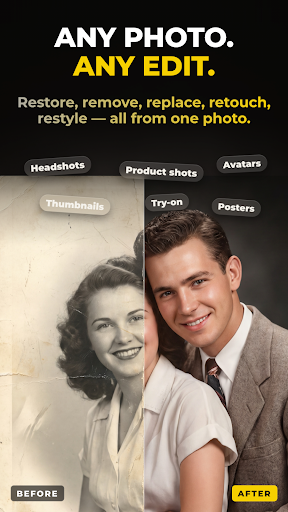
Restore old family photos. Remove strangers from the background. Turn a selfie into a professional headshot, or your pet into a 3D character. When an image turns out great, one tap animates it into video.
AI SONG — FROM A FEELING TO A FINISHED TRACK
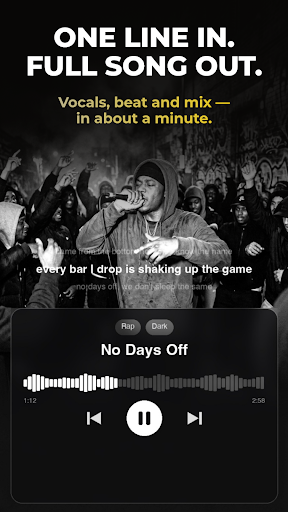
Describe what the song is about and Vezo does the rest — lyrics, vocals, instruments, production:
• AI-written lyrics in any language — English, Turkish, Spanish and beyond
• Review and edit every lyric line before the music is made
• 40+ genres, from Pop, Hip-Hop and R&B to EDM and Orchestral
• 18 moods, auto length or 1–3 minutes
• Unique AI cover artwork and title for every song
• Real files: download the MP3 or share it anywhere
Write a birthday anthem for a friend, a lullaby in your grandmother's language, or the breakup ballad you never knew you needed.
AI TOOLS — RESCUE ANY FOOTAGE
• Object Removal — erase photobombers, logos or clutter from any video; the scene rebuilds seamlessly
• AI Extend — describe what happens next and extend any clip up to 15 seconds
▶ SEE WHAT OTHERS MADE
Open the community feed and scroll real creations with the exact prompts behind them. Steal the recipe, tweak it, make it yours.
WHY CREATORS CHOOSE VEZO
• Always current — new models added as soon as they release
• One balance — the same credits work across video, image, song and tools
• Fair by design — credits only charged when your generation succeeds
• Built for focus — fast, dark, clutter-free
Download Vezo and turn your next idea into something you can watch, post and share — before your coffee gets cold.
더보기

1. 설치 프로그램 다운로드 하시고 설치하십시오

2. 미뮤 실행하고 바탕화면에서 구글 플레이 시작

3. 구글 플레이에서 AI Video Generator - Vezo AI 검색
Install
4. AI Video Generator - Vezo AI 다운로드 하시고 설치해 주세요
5. 아이콘 클릭해 주세요

6. Memu Play에서 AI Video Generator - Vezo AI 사용하기
MEmu Play는 5천만 명의 사용자에게 최고의 안드로이드 앱 경험을 제공하는 무료 안드로이드 에뮬레이터입니다. MEmu의 가상화 기술을 통해 최적의 그래픽 성능을 즐기면서 컴퓨터에서 수많은 안드로이드 앱을 원활하게 실행할 수 있습니다.
최상의 그래픽, 큰 스크린, 배터리, 데이터 걱정 완벽하게 해결.
키보드, 마우스 또는 게임패드를 사용하여 쾌적한 게임 플레이가 가능합니다..
미뮤 멀티를 이용하여 여러 개 게임과 앱을 멀티로 사용할 수 있습니다.
다음 절차에 따라 PC에서 AI Video Generator - Vezo AI을(를)플레이 할 수 있습니다.